
conscan Conscan - Container Scanner

Secure, Lean, and Compliant
Containers Made Simple

Scan container images for vulnerabilities, exposed secrets, inefficient storage, SBOM generation, and CIS Benchmark checks — all in one command.

$ docker run --rm ghcr.io/peek8/conscan:latest scan alpine:latest
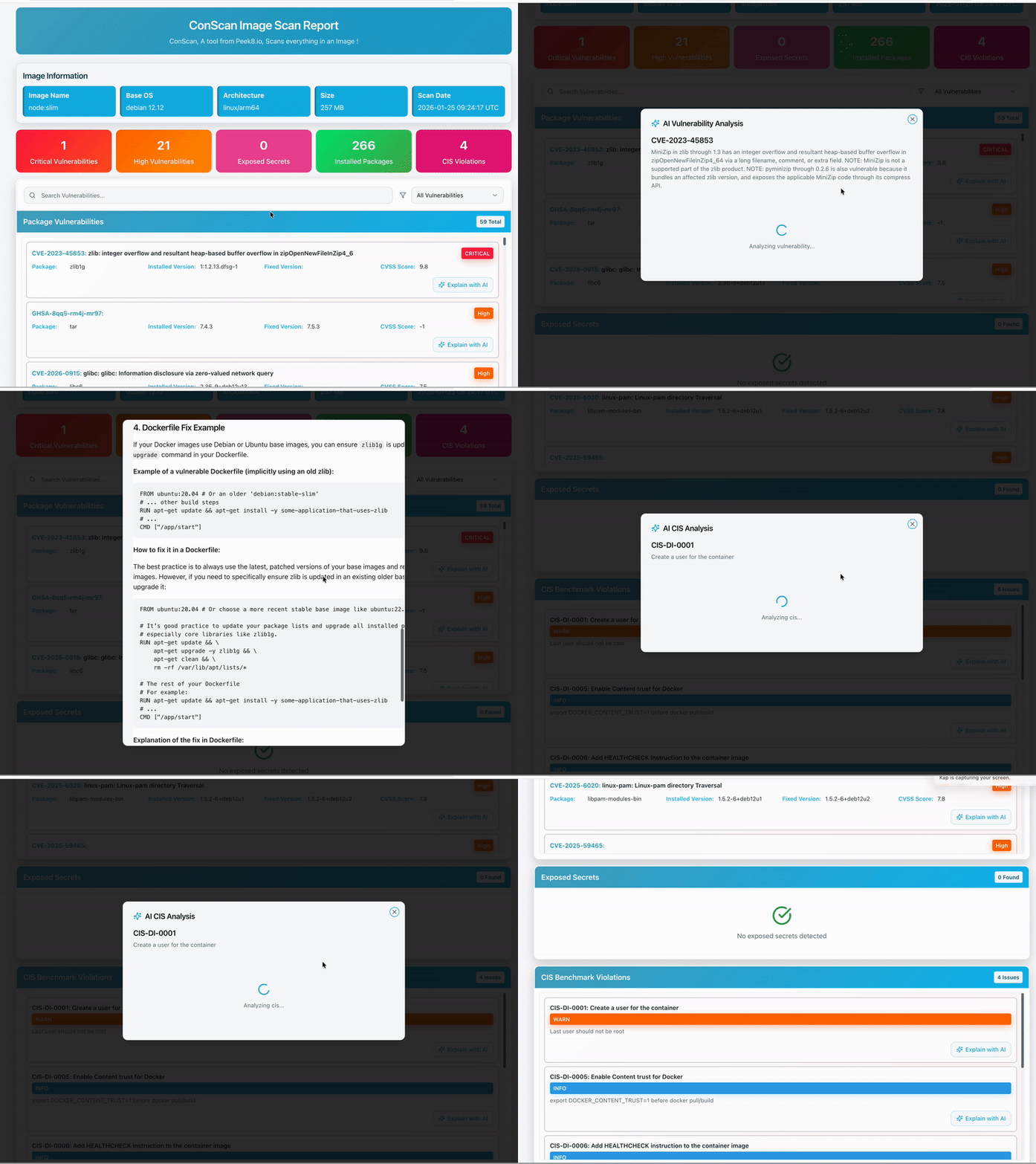
Complete Container Security

Everything you need to secure, optimize, and validate your container images before production.

🔍

Vulnerability Scanning

Scans OS packages and software dependencies against known vulnerabilities with detailed severity ratings.

🔑

Secret Detection

Detects API keys, tokens, passwords, and other sensitive information accidentally embedded in images.

📦

SBOM Generation

Produces a detailed Software Bill of Materials for visibility into all components in use.

📂

Storage Efficiency

Highlights large or unnecessary files that increase image size and identifies optimization opportunities.

🛡️

CIS Benchmark Checks

Validates images against Center for Internet Security (CIS) recommendations for compliance.

CI/CD Friendly

Designed for seamless integration into build pipelines with multiple output formats and minimal overhead.

Powered by Best-in-Class Tools

Conscan orchestrates industry-leading security tools into a single unified workflow.

Trivy

Vulnerabilities, secrets & misconfigurations

Grype

Deep vulnerability scanning

Syft

SBOM generation

Dive

Image efficiency analysis

Dockle

CIS Benchmark validation

Unified Scanning Pipeline

One command runs all scanners and produces a consolidated, actionable report.

🐳
Container Image
🔧
Conscan
🔍
Scanners
📊
Report
Scanner Function
Trivy Vulnerability scanning & secret detection
Grype OS package & dependency vulnerabilities
Syft Software Bill of Materials (SBOM)
Dive Image layer analysis & efficiency
Dockle CIS Benchmark compliance checks

Flexible Report Formats

Generate reports in the format that fits your workflow.

📋

Table

Human-readable CLI output for quick review

--format table
📄

JSON

Machine-readable for pipeline integration

--format json
🌐

HTML

Shareable reports for teams and auditors

--format html

Get Started in Minutes

Start scanning your container images with just a few commands.

1

Run with Docker (Recommended)

No installation required. Just run the container directly.

# Scan any container image docker run --rm -it ghcr.io/peek8/conscan:latest scan alpine:latest
2

Or Install Binary

Download the binary for your OS and install dependencies.

# Download and install (example for macOS ARM64) conscan_version=0.1.0-alpha1 wget -qO- https://github.com/peek8/conscan/releases/download/v${conscan_version}/conscan_${conscan_version}_darwin_arm64.tar.gz | tar -xz -C /usr/local/bin conscan
3

Scan Your Images

Run scans with custom options and output formats.

# Full scan with HTML report conscan scan --format html --output report.html yourimage:tag # Scan specific categories only conscan scan --scanners=vuln,secret yourimage:tag
4

Integrate with CI/CD

Add Conscan to your GitHub Actions workflow for automated scanning.

# In your GitHub Actions workflow - name: Scan container image run: | docker run --rm ghcr.io/peek8/conscan:latest \ scan ${{ env.IMAGE_NAME }}:${{ env.IMAGE_TAG }}

Start Securing Your Containers Today

Join developers and DevOps teams who trust Conscan to keep their container workloads secure, lean, and compliant.